
Supporting HP TeachNow, v 1.1 update

17
Admin interface (installation, usage)
Return to top
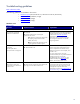
Question Responses/actions Explanation
Does the issue seem related to one of the Appendix D: Known issues?
Known issue?
Yes: Provide customer with the
guidance/workaround for the issue as described in
Appendix D: Known Issues
.
No: Continue.
The known issues listed in this document are
based on June 2010 information.
Installation: Is the issue related
to HP TeachNow installation?
Yes: Continue.
No: Go to Usage
section.
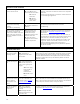
Is the customer installing on a
“clean” Windows 2008 Server
R2 x64 system?
Yes: Continue.
No: Advise that TeachNow is intended for
installation on a clean, dedicated server OS
installation. Elevate to 2LS if this is not possible or
acceptable to the customer.
HP TeachNow should be installed on a clean
(new) OS install with only the default settings
and services. TeachNow will configure the
necessary services and the initial settings.
Is the server OS configured with
a static IP address?
Yes: Continue.
No: The server must have a static IP address before
running the TeachNow installer.
The TeachNow server must have a static IP
address that is in the same subnet that they will
use for the clients. The clients receive their
address from DHCP.
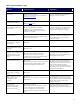
Did the installation fail with an
error message or a TeachNow
“internal error.”
Yes: Elevate to 2LS.
No: Continue.
Unknown issue.
Did the Installer portion of the
install complete (“Finish” screen
displayed)?
Yes: Continue.
No: Elevate to 2LS.
Unknown issue.
Did the customer let the HP
TeachNow “1
st
Run” procedure
perform the Network test and
did the test to locate a DHCP
server?
Yes: Continue.
No: Is the customer sure that a DHCP server is
present. If not, they should rerun the 1
st
Run
procedure (there is a shortcut in the Start menu) and
allow the procedure to test for DHCP.
TeachNow requires a DHCP server. The server
is normally not be on the same system with
TeachNow but it must be accessible from the
HP TeachNow network segment.
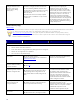
Do they have the license file?
Yes: Continue.
No: Point the customer to the “Contacting HP” section
at the beginning of the Admin Guide for contact
instructions for handling license-related issues.
The customer receives a License Redemption
Certificate with the TeachNow distribution. The
step-by-step instructions explain how they can
locate and download their license file.
Note: They will need the MAC address for the
HP TeachNow server system since the license
is keyed to the MAC address.
Is the customer trying to use
Active Directory to configure
users?
Yes: Elevate to 2LS.
No: Continue.
Did the customer export (Save)
the configuration when
prompted by the 1
st
Run
procedure?
Yes: Continue.
No: Rerun the 1
st
Run procedure and export/save the
configuration file.
The configuration file is required to set up the
Teacher interfaces. It must be provided, along
with the Teacher installer. The configuration file
tells the Teacher interface which server it
should connect with.
Did the customer
configure/verify the admin,
teacher, and student user
accounts on the server?
Yes: Continue examination.
No: The Admin should create/configure an Admin
account, verify that the HP_TeachNow_Student
account was configured, and create/configure
individual accounts for the teachers who will use the
system.
The Getting Started section in the Administrator
Guide explains the User and Group post-
Installation setup tasks that must be performed.