
Supporting HP TeachNow, v 1.1 update

16
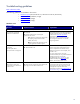
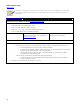
HP ProCurve switch verification
Is the customer using the HP
ProCurve 1810G switch?
Yes: Continue examination.
No: Is it a different (more
feature rich) ProCurve model?
Yes: Continue
examination.
No: Refer the
customer to the
switch vendor.
The ProCurve 1810G is the recommended switch for TeachNow.
However, more feature rich ProCurve switches are an acceptable
alternative.
HP cannot provide support for non-ProCurve switches unless there
is a valid HP support agreement.
Do the LEDs on the switch indicate
that the switch is functioning
correctly?
(Power LED on, Fault LED off)
Yes: Continue examination.
No: Transfer to ProCurve for
assistance.
If the LEDs indicate a failure/fasult in the switch, the issue should
be resolved by ProCurve before PSG can continue
troubleshooting.
Has the customer used the ProCurve
web interface to configure the
switch? Is its IP address on the same
subnet as the server and clients?
Have they enabled Flow Control on
the switch?
Yes: If the customer has
configured the switch as
directed, there may be
additional connectivity issues.
Elevate the call to 2LS.
No: Have the customer
configure the switch to fit the
TeachNow requirements.
The ProCurve 1810G configuration requirements are described in
the Appendix B: HP ProCurve 1810G 24 Port Switch
section of
this document.
If the switch does not have an IP address on the same subnet, no
connected devices will be able to communicate through the switch.
If the switch has a valid subnet IP address, but they have not
enabled flow control, the switch should function normally in most
usage cases. Heavier network traffic, with no flow control, can
generate intermittent symptoms such as hung clients or
incomplete/scrambled displays, but many TeachNow operations
may function normally.
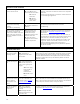
HP st5742/st5747 client
Is the customer using
HP st5742 or st5747
streaming clients?
Yes: Continue examination.
No: HP TeachNow is
supported on the HP st574x
clients ONLY.
HP does not support for any other student device. The same HP t574x/st574x
platform drivers are used on all TeachNow streamed OS images. The HP DM-
lite (Device Manager lite) software component in the images manages the
connection between TeachNow and the platform drivers. HP has not tested
and does not support the use of any other hardware platform with the HP
TeachNow software.
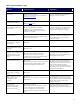
Does the st574x power
on?
Yes: Continue examination.
No: Does the unit power on
with a “known good” power
supply?
Yes: Power supply
failure, handle as
normal P/S
hardware event.
No: Handle as h/w
event.
Is this the known issue
where the client will not
wake up when the
teacher selects “Start
Class”?
Yes: Inform customer of the
issue that is described in the
Hardware topic in Appendix
D: Known and fixed Issues.
No: Continue.
If the customer has turned off the unit by pressing and holding the power
button on the st574x, the wake-on-LAN function is disabled. Press the power
button on the unit and it should resynchronize with TeachNow. Use TeachNow
to control the power state of the clients, not the power button.
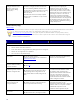
Does the unit attempt a
PXE boot when it
powers on?
Yes: Unit is configured
correctly and functioning
normally.
No: Reconfigure the BIOS
settings for Network boot first
in the boot order.
The st574x configuration requirements and boot behaviors are described in
the Appendix B: HP st5742/st5747
section of this document.