
Supporting HP TeachNow, v 1.1 update
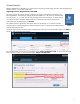
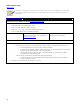

Import existing (an existing TeachNow image, a pre-built, or a backup copy)
Select “Import” and click Next. Select the desired suite from the list of “ready to use” and provide a name
and description. Click Edit to modify the Application Suite.
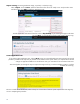
The Edit Application Suite Wizard launches. Select “Skip backup” if you want to go straight to edit when
you click Next, or just click Next to let the system create a backup copy.
Create application suite
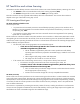
If you select Create Application Suite, clicking Next brings you to the Add Application Suite Wizard. The wizard
provides a printable list of steps that you perform on the reference client system. When you complete all the desired
changes or application additions on the reference client, you come back to the wizard and click Next.
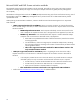
The wizard guides you through the steps to capture the image and copy it into the TeachNow system so it will be
available for streamin
g
.
The new wizards ensure that the user/admin always has a clear idea of what the system expects and what stage they
are at in completing the procedure.
12