
Supporting HP TeachNow, v 1.1 update



What’s New in HP TeachNow 1.1
• Updated and revised documentation set – the documentation set of three guides (Quick Start,
Teacher, and Admin) were rewritten to document the improved interface features and application procedures.
In addition, to address the feedback from customers who piloted TeachNow 1.0, additional technical detail
was added to clarify configuration requirements and operational processes.
• Updated administration console – many improvements were made to the usability of the
administration console to make system setup and operation more intuitive. These improvements include:
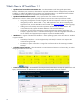
o Using setup/configuration wizards to replace all multi-click sequences so the user is guided
through the processes. These include: 1
st
Run, Add Application Suite, Discover Desktop, Edit
Application Suite, and the TeachNow Install wizards. (see Wizard example
on following page)
o Adding a Discover Desktops Wizard to implement auto-discovery of student stations. This
wizard electronically captures the MAC addresses of all connected desktops.
o Clarification of some of the terminology to match that used in the teacher’s application. For
example, “Application Suite” is used when describing the virtual disk image (the combination of
an OS and the set of applications) that supports a particular Student Desktop.
• Windows 7 – support of the Microsoft Windows 7 32-bit operating system on the client devices. Windows
7 support includes:
o Availability of Windows 7 on the Supplementary Disk DVD (for customer who acquire their
volume licensing from HP).
o The ability to capture a Windows 7 image from a reference device for streaming to Student
Desktops.
• Calendar improvements – Allow the teacher to create classes and lessons on all seven days, as well as
changing the start-time for the day.
• Context sensitive help – the TeachNow user help has been broken down into help for specific tasks and
topics, which the teacher or administrator can request from specific pages of the user interface.
10