
HP ProLiant Lights-Out 100 Remote Management User Guide for HP ProLiant ML110 G5 Servers

Using LO100 40
3.
Select a user by entering cd user1 or cd user#, where # is the user you want to modify and a
whole number between 2 and 16.
4. To change the user name, enter set username=<new username>. For example:
/./map1/accounts/user2/> set username=testuser2
5. To change the user password, enter set password=<new password> and enter the new
password when prompted. For example:
/./map1/accounts/user2/> set password=testpswd2
Passwords are case-sensitive and can contain up to 16 characters.
6. To change the group name enter, set group=<new group name>. Valid group settings are
administrator, user, oemhp, and operator. For example:
/./map1/accounts/user2/> set group=user
Network settings
You can view and modify network settings for LO100 using a web browser, CLP, or the BIOS Setup
Utility. If you change the IP address, the connection to the server terminates. You must reconnect to the
server using the new IP address.
Configuring network settings using a web browser
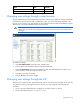
The Network Settings screen displays IP address, subnet mask, and other TCP/IP-related settings. From the
Network Settings screen, you can enable or disable DHCP, and you can configure a static IP address for
servers not using DHCP. You can view and modify the network settings when logged in as either OEM or
administrator (admin).
To modify the network settings, click Network Settings on the browser main menu navigation bar, enter
the new settings, and click Apply.
Configuring network settings using the CLP
1. Log in to LO100 CLP as described in the "Logging in to LO100 (on page 21)" section.
2. At the command prompt, enter cd map1/nic1.