
HP ProLiant Lights-Out 100 Remote Management User Guide for HP ProLiant ML110 G5 Servers

Using LO100 20
option is required in the command line every time the load command is executed unless -help
is used. The file must be an uncompressed firmware image file that you create using the DOS
ROMPAQ utility found on the Lights-Out 100 Firmware Upgrade Diskette Utility available for
download from the HP website (http://www.hp.com/servers/lights-out
).
To create the uncompressed image file, enter the following command from DOS:
ROMPAQ /D <infile> <outfile>
where <infile> is the ROMPAQ firmware image file and <outfile> is the filename for the
uncompressed binary image file.
The load command returns any status data on the first lines. After the status data appears, one of
the following lines of text displays on the next line:
— <URL> transferred to <target address> (if the file is transferred)
— <URL> not transferred (if the file is not transferred)
Example:
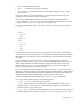
load -source //192.168.2.1/pub/firmwareimage.bin -oemhpfiletype csr
//192.168.2.1/pub/firmwareimage.bin transferred to
/map1/firmware/fullimage
• The reset command causes a target to cycle from enabled to disabled and then back to enabled.
• The set command assigns a specific value to a property or group of properties. The standard
syntax for the set command is set property = new value.
The set command is used to change any changeable property. If the current directory does not
contain the property you want to change, the target of the property must be specified before entering
the property you want to change.
• The start command causes a target to change state to a higher run level.
• The stop command causes a target to change state to a lower run level.
• The version command queries the version of the CLP implementation or other CLP elements. For
example:
/./map1/-> version
Version 1.00
/./map1/-> cd firmware
/./map1/firmware/-> version
Version 1.00
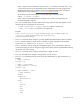
/./map1/firmware/-> show
/./map1/firmware
Targets
Properties
fwversion=0.59
Verbs
cd
version
exit
show
reset
load