
HP ProLiant Lights-Out 100 Remote Management User Guide for HP ProLiant ML110 G5 Servers
Using LO100 19
o
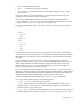
The cd command changes the directory.
o The cd .. command moves up the tree one directory.
o The cd myfolder command moves to the myfolder folder assuming myfolder is in the
current directory.
To move to a directory not in the current directory, you must enter the full path. The root in the
command line is forward slash, period, forward slash (/./).
If you are in the system1 folder and want to move to the map1 folder, issue the command cd
/./map1. Neither cd /map1 nor cd map1 works. The filename is not case-sensitive, whereas the
command is case-sensitive (cd MaP1 works while CD map1 does not).
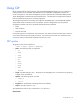
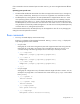
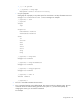
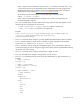
• The show command displays values of a property or contents of a collection target. For example:
/./> show
/.
Targets
system1
map1
Properties
Verbs
cd
version
exit
show
help
The first line of information returned by the show command is the current context. In the example, /
is the current context. Following the context is a list of subtargets (Targets) and properties (Properties)
applicable to the current context. The verbs section (Verbs) shows what commands are available in
this context.
The show command can also be specified with an explicit or implicit context and a specific
property. An explicit context is /map1/firmware and is not dependent on the current context. An
implicit context assumes that the context specified is a child of the current context. If the current
context is /map1, then a show firmware command displays the /map1/firmware data. If a
property is not specified, then all properties are shown.
• The load command moves a binary image from a URL to the map. The load command is used to
take a binary image from a specific source location (specified as a URL) and place it at the specified
target address. In a remote management processor implementation, the firmware downloads a full
image file using TFTP from the specified location and programs flash with the image.
In a remote management processor implementation, /map1/firmware is a valid target.
The load command supports usage only with the following options.
o -source <location>—This option must be specified.
o (h)elp—This option appears on the command line, the command ignores all options and
properties except -output (for terse or verbose output). These options are only valid for this
command when the -help option is used.
o source <value>—This option specifies the target from which it transfers the binary image. The
value specified must be a valid URL. The format is //tftpserverip/path/filename. This