
HP ProLiant Lights-Out 100 Remote Management User Guide for HP ProLiant ML110 G5, ML115 G5, DL120 G5, ML150 G5, DL160 G5, DL165 G5, DL1809 G5, DL185 G5, and SL165z G6 Servers
Using LO100 23
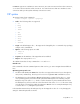
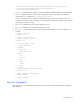
name=Hewlett-Packard
enabledstate=enabled
Verbs
cd
version
exit
show
reset
start
stop
help
/./system1/-> help name
Unsupported Command
/./system1/-> help enabledstate
Unsupported Command
/./system1/-> help properties
Unsupported Command
/./system1/-> name -h
Invalid command
/./system1/->
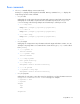
• The exit command terminates the CLP session.
• The cd command sets the current default target. The context works similar to a directory path. The
root context for the server and the starting point for a CLP system is /. (forward slash period). By
changing the context, you can shorten commands.
For example:
o The cd command changes the directory.
o The cd .. command moves up the tree one directory.
o The cd myfolder command moves to the myfolder folder if myfolder is in the current
directory.
• The show command displays values of a property or contents of a collection target. For example:
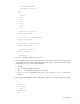
/./> show
/.
Targets
system1
map1
Properties
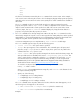
Verbs