
Intel Matrix Storage Manager User's Manual

“RAID Ready”
R
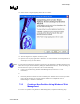
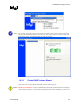
14. Select ‘Finish’ to begin migrating data to the new volume:
15. After the migration is complete, reboot the system
16. Optional: Use 3rd party application or Windows* to create and format a new data partition on
unused space, if any (see Note below)
Note: To ensure that non-Windows* partitions are kept intact, the migration to a RAID volume does not
utilize the extra space made available by adding the additional hard drive(s). To take advantage of
the extra hard drive space you will need to do one of the following:
x Create a new partition using Windows Disk Management (See Section 17.3.3 for
instructions)
or
x Extend the partition to fill the rest of the available space. Windows does not natively include
tools to do this, but there are 3rd party software utilities to accomplish this such as
PartitionMagic* or Partition Commander*.
7.3.3 Creating a New Partition Using Windows* Disk
Management
To create a new partition using Windows* Disk Management, complete the following steps:
User's Manual 51