
Intel Matrix Storage Manager User's Manual

Intel® Matrix Storage Manager Installation
R
6.3 Installation
Once the Intel® Matrix Storage Manager has been obtained, identify the location of the file on
your hard drive. Then, run the file(e.g. iata5x_enu.exe or iata5x_cd.exe) by double-clicking on
the file name; this will launch the installation program.
Note: The instructions below assume that the Intel® Matrix Storage Manager option ROM and BIOS
have been configured correctly and the RAID driver has been installed using the F6 installation
method.
6.3.1 Installation Steps
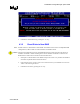
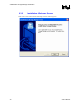
After you click on the .EXE file, installation will begin and the following screen will temporarily
appear:
User's Manual 29