
Intel Matrix Storage Manager User's Manual

Loading the Intel® Matrix Storage Manager Driver During Operating
S
R
5.2 Installation Using F6 Installation Method
To install the Intel® Matrix Storage Manager driver using the F6 installation method, complete
the following steps:
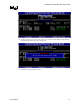
1. Press F6 at the beginning of Windows XP setup (during text-mode phase) when prompted in
the status line with the ‘Press F6 if you need to install a third party SCSI or RAID driver’
message. Note: After pressing F6, nothing will happen immediately; setup will temporarily
continue loading drivers and then you will be prompted with a screen to load support for
mass storage device(s).
2. Press the ‘S’ key to ‘Specify Additional Device’.
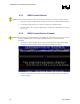
3. You will be prompted to ‘Please insert the disk labeled Manufacturer-supplied hardware
support disk into Drive A:’ After you see the prompt, insert the floppy disk containing the
following files: IAAHCI.CAT, IAACHI.INF, IASTOR.CAT, IASTOR.INF, IASTOR.SYS,
and TXTSETUP.OEM. and press ENTER.
Note: See Section 14.1 titled ‘Instructions on Creating F6 Floppy Diskette’ for instructions on how to
extract these files from the Intel® Matrix Storage Manager Setup.exe file.
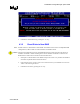
4. After pressing ENTER, you should be shown a list of controllers that includes your particular
RAID or AHCI controller. Select the entry that corresponds to your BIOS setup and press
ENTER. Note: Only four selections may appear in the list; use the up or down arrow keys to
see additional options.
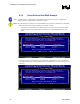
5. The next screen should confirm the selected RAID or AHCI controller. Press ENTER again
to continue.
6. At this point, you have successfully F6 installed the Intel® Matrix Storage Manager driver
and Windows XP setup should continue. Leave the floppy disk in the floppy drive until the
system reboots itself because Windows setup will need to copy the files again from the
floppy to the Windows installation folders. After Windows setup has copied these files again,
remove the floppy diskette so that Windows setup can reboot as needed.
User's Manual 27