
Intel Matrix Storage Manager User's Manual

Intel® Matrix Storage Manager Option ROM
R
4.3.6 Reset Disks to Non-RAID Example
Note: Possible reasons to ‘Reset Disks to Non-RAID’ could include issues such as configurations, a
failed volume or a failed member of a RAID 0 volume.
Caution: By performing this operation, any internal RAID structures will be lost and all data on the RAID
member hard drives unless they are members of a RAID 1 volume.
1. Select option 3 ‘Reset Disks to Non-RAID’ and press the <Enter> key to delete the RAID
volume and remove any RAID structures from the drives and the following window will
appear:
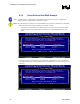
2. Select the hard drives that should be reset by using the [SPACE] bar to select. A green arrow
will appear immediately to the left of the hard drives after they have been selected similar to the
following:
24 User's Manual