
Intel Matrix Storage Manager User's Manual

Intel® Matrix Storage Manager Option ROM
R
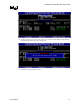
3. Confirm the volume deletion by pressing the <Y> key.
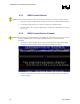
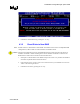
4.3.5 Reset Disks to Non-RAID
Note: Possible reasons to ‘Reset Disks to Non-RAID’ could include issues such as incompatible RAID
configurations, a failed volume or a failed member of a RAID 0 volume.
Caution: All data on the RAID drives and any internal RAID structures will be lost unless the drives are
members of a RAID 1 volume. Resetting drives that are members of a RAID 1 volume to non-
RAID will not result in the loss of data on those member drives.
1. Select option 3 ‘Reset Disks to Non-RAID’ and press the <Enter> key to delete the RAID set
and remove any RAID structures from the drives.
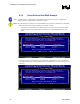
2. In the selection screen, use the <space> bar to select the drives you would like to reset. Press
<Enter> after selecting the drives.
3. Confirm the selection by pressing the <Y> key.
User's Manual 23