
Intel Matrix Storage Manager User's Manual

Intel® Matrix Storage Manager Option ROM
R
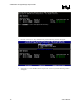
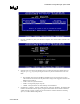
7. Press the <ENTER> key after your selection is complete. The window will be returned to the
main menu:
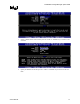
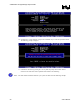
8. Select the strip size value for the RAID 0 array by scrolling through the available values by
using the <
Ĺ> or <Ļ> keys and pressing the <Enter> key to select and advance to the next
field.
The available values range from 4KB to 128 KB in power of 2 increments. The strip
value should be chosen based on the planned drive usage. Some suggested selections for
RAID 0 are listed below.
x
16 KB – Best for sequential transfers
64 KB – Good general purpose strip size
128 KB – Best performance for most desktops and workstations
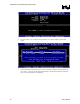
9. Scroll down to ‘Capacity’, enter the volume capacity, and press <ENTER>. The default value
indicates the maximum volume capacity using the selected disks. If less than the maximum
volume capacity is chosen, creation of a second volume is needed to utilize the remaining
space (i.e. a matrix RAID configuration).
User's Manual 19