
ProLiant ML110 Generation 2 Server Maintenance and Service Guide
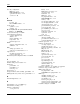
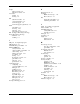
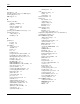
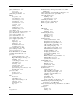

Index
Redundant Array of Inexpensive Disks See SATA
RAID card
physical dimensions 5-4
server 5-4
relative humidity, environmental specifications 5-4
system board 5-4
remote management card, part number 1-3
plastics kit, part number 1-2
removable media device
POST
installing 2-16
beep codes 3-17
supported devices 2-16
error indicators 3-14
return kit, part number 1-4
errors messages 3-15
RJ-45 connector See LAN port
network boot 3-14
RJ-45 receptacle symbol 2-3
non-fatal errors 3-14
overview 3-14
running 3-14
S
terminal error 3-17
S.M.A.R.T.
troubleshooting 3-18
activating 4-12
power button 4-2
definition 4-12
power cord, electric shock warning 2-4
SATA backplane board
power fluctuations, caution 2-5
connectors 2-13
power sources symbol 2-3
illustration 2-13
power status indicator 4-9
part number 1-3
power supply cable socket 4-3
SATA hard drive
power supply requirements
activity status indicator 4-10
input 5-5
backplane board, hot-plug 2-13
input range 5-5
backplane board, part number 1-3
inrush type 5-5
cable assembly, part number 1-4
maximum current 5-5
cable routing, hot-plug 2-13
operating power 5-5
cable routing, non-hot-plug 2-12
power supply unit See PSU
fault identification indicator 4-11
power-down procedures 2-4
hot-plug, installing 2-23
power-on password 3-8
hot-plug, specifications 5-8
Power-On Self-Test See POST
non-hot-plug, installing 2-21
pre-failure threshold levels 3-5
part number 1-4
processor
RAID controller card, part number 1-3
applying thermal grease 2-27
SATA RAID card 2-14
Hyper-Threading technology 3-5
system board connectors 4-5
installing 2-28
SATA RAID card
overheating prevention 2-28
connectors 2-14
part number 1-3
illustration 2-14
removing 2-25
specifications 5-10
socket location 2-25
screwdriver symbol 2-3
specifications 5-6
SCSI hard drive
system board power connector 4-6
activity indicator 4-9
thermal patch 2-26
cable assembly, part number 1-4
processor socket
cable routing, non-hot-plug 2-12
location 2-25
controller card, part number 1-3
specification 5-2
installing 2-20
PSU
part number 1-4
model 5-5
specifications 5-8
part number 1-4
storage controller, specifications 5-9
replacement warnings 2-36
Self-Monitoring Analysis and Reporting
Technology See S.M.A.R.T.
replacing 2-36
specifications 5-5
Serial Advanced Technology Attachment See SATA
hard drive
type 5-3
serial port
R
location 4-3
rear panel 4-3
locking 3-13
HP ProLiant ML110 Generation 2 Server Maintenance and Service Guide Index-5