
ProLiant ML110 Generation 2 Server Maintenance and Service Guide
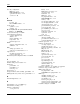
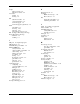
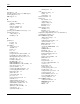
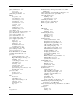

Index
height
K
with foot stands 5-4
Kensington lock 4-3
without foot stands 5-4
keyboard
hot surface
POST error message 3-15
symbol 2-3
PS/2 connector 4-3
warning 2-5
kits
HP
plastics kit, part number 1-2
authorized reseller 1-5
return kit, part number 1-4
contact information 1-5
technical support 1-5
L
technical support requirements 1-5
HSF
labels See symbols on equipment
part number 1-3
LAN controller 5-2
removing 2-26
LAN LED indicators
replacing 2-29
activity/link status 4-13
system board connector 4-5
network speed 4-13
HT See Hyper-Threading technology
LAN port 4-3
Hyper-Threading technology
legend bar 3-4
definition 3-5
length 5-4
enabling 3-5
with bezel 5-4
without bezel 5-4
I
M
I/O ports See input/output ports
I/O subsystem 5-2
mass storage devices
I2C LED cable, part number 1-4
drive bay configuration 2-10
IDE CD-ROM drive
part number 1-4
activity indicator 4-8
mechanical components
cable assembly, part number 1-4
illustration 1-2
cable routing 2-11
spare parts list 1-2
Cable-Select mode 2-15
media storage
eject button 4-2
default 5-2
locking 3-13
optional 5-2
mechanical eject hole 4-2
memory controller 5-2
part number 1-4
memory modules
replacing 2-14
channels 2-30
specifications 5-6
DIMM slots 2-30
input/output ports
guidelines for installation 2-30
configuring 3-5
installing 2-31
connecting I/O devices 4-4
module orientation 2-31
LAN port 4-3
part number 1-3
parallel port 4-3
removing 2-31
PS/2 keyboard port 4-3
specifications 5-5
PS/2 mouse port 4-3
menu bar 3-5
serial port 4-3
mouse
super I/O chipset 4-5
POST error message 3-15
USB ports, front 4-2
PS/2 connector 4-3
USB ports, rear 4-3
multi-boot support 3-6
video port 4-3
Item Specific Help panel 3-4
HP ProLiant ML110 Generation 2 Server Maintenance and Service Guide Index-3