
ProLiant ML110 Generation 2 Server Maintenance and Service Guide
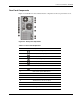

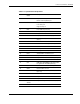

Connectors, Switches, and LEDs
S.M.A.R.T. Function
Self-Monitoring Analysis and Reporting Technology or S.M.A.R.T. is an interface function
between the system BIOS and the SATA hard drive. When enabled BIOS receives
information from the SATA drive that allows the former to send a warning message of
possible hard drive failure
.
To activate the S.M.A.R.T. function:
1. Turn on the monitor and the server.
If the server is already turned on, save your data and exit all open applications, then
restart the server.
2. During POST, press F10.
If you fail to press F10 before POST is completed, you will need to restart the server.
3. Under the
Main menu click IDE Channel 0 Master.
4. Set the
SMART Monitoring option to Enabled.
5. Press F10 to save the changes you made and close the PhoenixBIOS Setup Utility.
Rear Panel LED Indicators
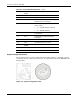
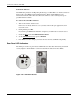
The LAN port on the rear panel has two LED indicators that allow monitoring of network
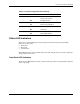
activity. Figure 4-10 and Table 4-7 show and describe the function of these LEDs.
Figure 4-10: LAN LED indicators
4-12 HP ProLiant ML110 Generation 2 Server Maintenance and Service Guide