
ProLiant ML110 Generation 2 Server Maintenance and Service Guide
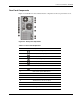

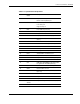

Connectors, Switches, and LEDs
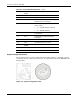
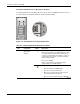
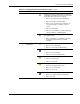
Table 4-5: Power/System Health LED Indicator Status
Function Status Description
Steady green The server is operating normally.
Flashing green The server is in standby mode (auxiliary power
present).
Power status indicator
Off The server is powered off (AC power
disconnected).
System health indicator Steady amber A pre-failure system threshold has been
breached. This may be any of the following:
• At least one fan failure
• At least one processor failure
• At least one of the temperature sensors
reached critical level
• At least one processor VRM (voltage
regulator) failure
• At least one memory module exceeds the
max single bit error rate
Hard Drive Activity LED Indicators
Hard Drive Activity LED Indicator for SCSI/IDE/Non-hot-plug SATA Drives
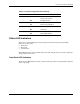
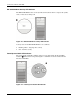
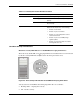
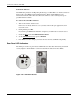
The status of any SCSI, IDE, or non-hot-plug SATA device installed in the server is indicated
by the drive activity LED indicator
located on the front panel of the server.
Figure 4-8: Drive activity LED indicator for SCSI/IDE/non-hot-plug SATA drives
Activity states for a SCSI, IDE, and non-hot-plug SATA drive are as follows:
• Flashing amber – Ongoing drive activity
• Off – No drive activity
HP ProLiant ML110 Generation 2 Server Maintenance and Service Guide 4-9