
ProLiant ML110 Generation 2 Server Maintenance and Service Guide
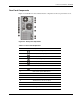

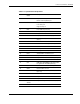

Connectors, Switches, and LEDs
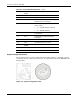
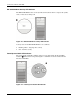
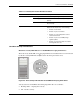
Table 4-4: System Configuration Switch Settings
Switch Status Function
SW1-1 On
Off
Enable FWH (firmware hub)
protection by software
No FWH protection
SW1-2 On
Off
Clear password enabled
Clear password disabled
SW1-3 On
Off
Boot block enabled
Normal boot
SW1-4 On
Off
Clear CMOS enabled
Clear CMOS disabled
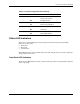
Status LED Indicators
This section contains illustrations and descriptions of internal and external status LED
indicators located on the:
• Front panel
• Rear panel
• System board
These LED indicators aid in problem diagnosis by indicating the status of system components
and operations of the server.
Front Panel LED Indicators
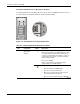
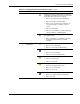
The front panel LED indicators allow constant monitoring of basic system functions while the
server is operating.
HP ProLiant ML110 Generation 2 Server Maintenance and Service Guide 4-7