
ProLiant ML110 Generation 2 Server Maintenance and Service Guide

4
Connectors, Switches, and LEDs
This chapter contains illustrations and tables identifying and describing the connectors,
switches, buttons, and LED indicators located on the front panel, rear panel, system board
and hard drives of the HP ProLiant ML110 Generation 2 server.
Connectors and Components
This section contains illustrations and tables identifying connectors and components on the
front and rear panels of the server, as well as those located on the system board.
Front Panel Components
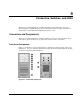
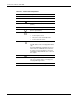
Figure 4-1 and Table 4-1 show and describe the components on the front panel of the server.
In Figure 4-1, the server is shown with both the front bezel attached (items labeled 1 through
9), and removed (items labeled 10 and 11).
Figure 4-1: Front panel components
HP ProLiant ML110 Generation 2 Server Maintenance and Service Guide 4-1