
ProLiant ML110 Generation 2 Server Maintenance and Service Guide

Diagnostic Tools
Diagnostics for Windows
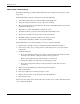
Diagnostics for Windows provides an easy-to-use hardware diagnostic for server verification
and rapid troubleshooting. This utility is installed from the HP ProLiant ML110 Generation 2
Server Support CD, and run under Microsoft Windows. For instructions on installation and
use, refer to the README file located inside the
Diagnostics for Windows folder in the
Support CD.
HP recommends using Diagnostics for Windows to verify all server functions are operating
correctly, after completing all the configuration steps. The utility generates a text file
containing the hardware detected and the test results. This text file should be saved to a
diskette for future reference or use by your support provider.
For More Information
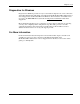
For more information about the diagnostic tools described in this chapter, and other tools
available for your server, refer to the Servers Troubleshooting Guide on the
HP ProLiant ML110 Generation 2 Server Support CD. For the most recent version of this
guide, go to
www.hp.com.
HP ProLiant ML110 Generation 2 Server Maintenance and Service Guide 3-19