
ProLiant ML110 Generation 2 Server Maintenance and Service Guide

Diagnostic Tools
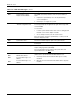
Table 3-3: POST Error Messages continued
Error code Error message Description/corrective action
0250 System battery is dead -
Replace and run SETUP
The CMOS clock battery indicator shows the system battery is
dead.
1. Replace the system battery. Go to the “System Battery”
section of Chapter 2.
2. Run Setup to reconfigure the system.
0251
System CMOS checksum bad
- Default configuration used
The settings in the Setup Utility have been corrupted or modified
incorrectly, perhaps by an application program that changes data
stored in CMOS.
You can either:
• Load the system default values. Refer to the “Loading System
Defaults” section in this chapter for details.
• Access Setup and enter your own custom values.
If the error persists, check the system battery or contact your HP
Customer Support provider.
0260 System timer error * The timer test failed. Requires repair of the system board.
0270 Real time clock error * Real-Time Clock (RTC) fails BIOS hardware test. May require
board repair.
0271 Check date and time settings BIOS found date or time out of range and reset the RTC. May
require setting legal date (1991-2099).
Access Setup and check the values in the System Time and
System Date fields of the
Main menu.
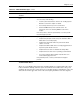
02B0
02B1
02B2
02B3
Diskette drive A error
Diskette drive B error
Incorrect Drive A type - run
SETUP
Incorrect Drive B type - run
SETUP
Applicable only if an optional diskette drive is installed. The
diskette drive is present but fails the POST diskette tests.
1. Run Setup and check if the diskette drive type is correctly
identified.
2. Open the server and check that the diskette drive is properly
installed.
continued
3-16 HP ProLiant ML110 Generation 2 Server Maintenance and Service Guide