
ProLiant ML110 Generation 2 Server Maintenance and Service Guide

Diagnostic Tools
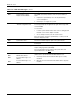
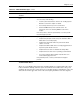
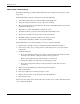
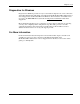
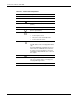
Table 3-3 lists down the most common POST error messages with their corresponding
troubleshooting recommendation. It is recommended that you correct the error before
proceeding, even if the server appears to boot successfully.
If your system displays one of the messages marked below with an asterisk (*), write down
the code and message and contact your HP Customer Support provider.
When no POST error message is displayed but the server stops during POST, listen for beep
codes.
Table 3-3: POST Error Messages
Error code Error message Description/corrective action
0200 Failure Fixed Disk Fixed disk is not working or not configured properly.
1. Run Setup and check if the fixed-disk type is correctly
identified.
2. Check to see if fixed disk is attached properly.
0210 Stuck key Stuck key on keyboard.
1. Locate the stuck key on your keyboard and release it.
2. Reboot the server.
Mouse error Mouse not working.
Verify the mouse cable is securely connected to the mouse port
(not the keyboard port) on the rear panel of the server.
If the problem persists, replace the mouse or contact your HP
Customer Support provider.
0211 Keyboard error Keyboard not working.
Verify that the keyboard cable is securely connected to the
keyboard port (not the mouse port) on the rear panel of the server.
If the problem persists, replace the keyboard or contact your HP
Customer Support provider.
0212 Keyboard Controller Failed * Keyboard controller failed test.
0220 Monitor type does not match
CMOS - Run SETUP
The attached monitor cannot be correctly identified in by Setup.
Run Setup and check if the monitor type is correctly identified.
continued
HP ProLiant ML110 Generation 2 Server Maintenance and Service Guide 3-15