
ProLiant ML110 Generation 2 Server Maintenance and Service Guide

Diagnostic Tools
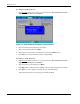
To set a system password:
NOTE: A Supervisor password should be set first before a User password can be defined.
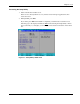
1. In the Security menu screen, select a set password field—Set User Password or Set
Supervisor Password, then press Enter.
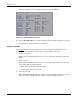
Figure 3-3: Setup window for setting a system password
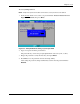
2. Type a new password in the password box.
The password may consist of up to eight alphanumeric characters (A-Z, a-z, 0-9).
3. Retype the password to verify the first entry, then press Enter.
4. Press F10 to save the password and close the Setup Utility.
After setting the password, Setup automatically sets the selected password field to
Enabled.
HP ProLiant ML110 Generation 2 Server Maintenance and Service Guide 3-9