
ProLiant ML110 Generation 2 Server Maintenance and Service Guide

Diagnostic Tools
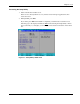
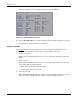
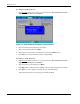
The System Summary Screen is displayed briefly at the end of POST.
Figure 3-2: System Summary Screen
6. Press the Pause/Break key to continue displaying the screen until another key is pressed.
7. Press any key to continue with the system bootup.
System Passwords
The
Security menu lets you set system passwords that would provide different levels of
protection for the server. There are three types of passwords that you can set:
• Supervisor password
Entering this password will allow the user to access and change all settings in the Setup
Utility.
• User password
Entering this password will restrict a user’s access to the Setup menus. A user can only
access and modify the following fields:
— Main menu: System Time and System Date
— Security menu: Set User password
• Power-on password
When the Password on Boot field is enabled, a password will be required to boot up the
server. To enable or disable this field, a supervisor password must first be set.
3-8 HP ProLiant ML110 Generation 2 Server Maintenance and Service Guide