
ProLiant ML110 Generation 2 Server Maintenance and Service Guide

Diagnostic Tools
Accessing the Setup Utility
1. Turn on the monitor and the server.
If the server is already turned on, save your data and exit all open applications, then
restart the server.
2. During POST, press F10.
If you fail to press F10 before POST is completed, you will need to restart the server.
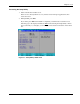
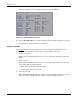
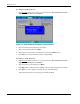
The first page to be displayed will be the
Main menu showing the Setup Utility’s menu
bar. Use the left (←) and right (→) arrow keys to move between selections on the menu
bar.
Figure 3-1: Setup Utility’s Main menu
HP ProLiant ML110 Generation 2 Server Maintenance and Service Guide 3-3