
ProLiant ML110 Generation 2 Server Maintenance and Service Guide

Removal and Replacement Procedures
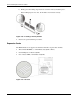
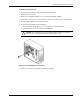
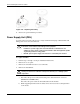
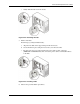
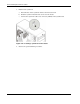
8. Install the expansion card:
a. Slide the expansion card into the selected slot and press it down to seat it properly.
b. Firmly press the retention clip until it snaps into place.
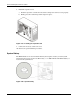
Figure 2-39: Installing an expansion card
9. Connect the necessary cable to the card.
10. Observe the post-installation procedures.
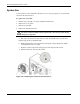
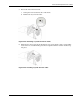
System Battery
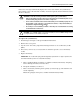
The HP ProLiant server uses nonvolatile memory that requires a battery to retain system
information when power is removed. The battery, a 3-V 200-mAh internal lithium battery, is
located on the system board.
Figure 2-40: System battery
2-34 HP ProLiant ML110 Generation 2 Server Maintenance and Service Guide