
ProLiant ML110 Generation 2 Server Maintenance and Service Guide


Removal and Replacement Procedures
CAUTION: Applying too much grease will cause a gap between the contact surfaces.
This means that the heatsink is not even in direct contact with the processor, and
therefore its capacity to draw out heat is greatly reduced. Applying too much grease could
also make the grease squish out from the sides and go all over the processor pins or to
the system board base once the heatsink is installed. This may cause electrical shorts that
can damage your system.
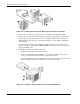
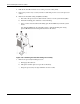
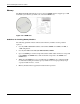
10. Install the new processor:
a. With the load lever and the retention plate still disengage, hold the processor by its
edges and align it over the empty processor socket.
Make sure that processor is properly aligned with the orientation notch on the socket.
b. Insert the processor into the socket.
c. Close down the retention plate.
d. Engage the load lever back into place.
Figure 2-32: Installing a processor
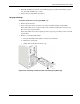
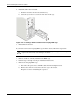
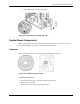
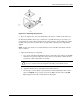
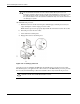
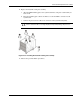
Once the processor is installed, the HSF must be reinstalled on top of the processor socket.
The thermal grease you applied on the contact surfaces of the HSF and the processor provides
the necessary thermal bonding to allow the heatsink to draw away heat from the processor.
CAUTION: To prevent overheating or a possible system crash, use only an HSF assembly
specified for the HP ProLiant ML110 Generation 2 server.
2-28 HP ProLiant ML110 Generation 2 Server Maintenance and Service Guide