
ProLiant ML110 Generation 2 Server Maintenance and Service Guide


Removal and Replacement Procedures
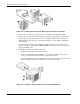
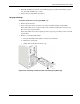
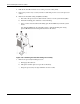
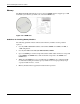
Figure 2-31: Removing the processor
8. Place the old processor on a static-dissipating work surface or inside an anti-static bag.
To allow the heatsink to draw away as much heat as possible from the processor base, it is
required there be a tight connection between the contact surfaces—the heatsink base and the
top side of the processor. To ensure this, it is required that a thermal grease compound be
applied.
NOTE: For this server model, it is recommended that you use the Shin Etsu G751 brand of thermal
grease compound.
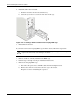
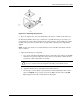
9. Apply the thermal grease compound:
a. Use a clean cloth dipped in rubbing alcohol to clean both contact surfaces in the HSF
and in the new processor. Wipe the contact surfaces several times to make sure that
no particles or dust contaminants are evident.
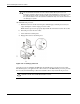
CAUTION: Never touch the bottom of the processor; any contaminant on this side of the
processor could prevent the mounting pads from making contact with the socket.
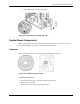
b. Apply the thermal grease compound to both contact surfaces.
c. Use the edge of a razor blade to spread out the grease throughout the entire contact
surface and lightly scrape out any excess grease. Make sure that only a very thin
layer is applied so that the contact surface is still visible.
HP ProLiant ML110 Generation 2 Server Maintenance and Service Guide 2-27