
ProLiant ML110 Generation 2 Server Maintenance and Service Guide


Removal and Replacement Procedures
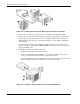
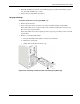
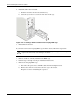
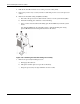
c. Gently slide out the cage from the chassis.
Figure 2-28: Removing the hot-plug HDD cage
System Board Components
Refer to the following sections for instructions on how to remove or replace the processor,
the memory modules, the expansion cards, and the system battery.
Processor
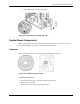
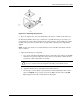
The server LGA775 processor socket supports Intel
Pentium 4 processors.
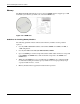
Figure 2-29: LGA775 processor socket
To replace the processor:
1. Perform steps 1 through 3 of the pre-installation instructions.
2. Remove the access panel.
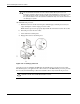
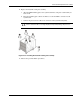
3. Lay the server on its side (components showing).
HP ProLiant ML110 Generation 2 Server Maintenance and Service Guide 2-25