
ProLiant ML110 Generation 2 Server Maintenance and Service Guide

Removal and Replacement Procedures
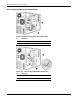
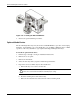
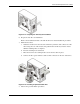
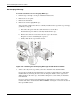
Figure 2-20: Installing a non-hot-plug HDD cage (SATA)
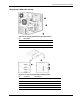
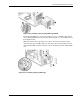
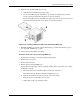
For the hot-plug HDD cage, connect the SATA power, data, and LED cables to their
corresponding backplane board connectors. Refer to Figure 2-13 for an illustration of
the backplane board.
Make sure that the other end of the power cable is connected to the PSU, and the
other end of the data and LED cables are connected to their corresponding connector
on the SATA RAID card. Refer to Figure 2-14 for an illustration of the SATA RAID
card.
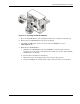
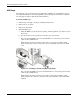
Figure 2-21: Installing a hot-plug HDD cage
HP ProLiant ML110 Generation 2 Server Maintenance and Service Guide 2-19