
ProLiant ML110 Generation 2 Server Maintenance and Service Guide

Removal and Replacement Procedures
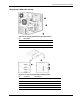
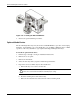
Figure 2-14: Hot-plug SATA HDD RAID card
No. Connector Description
1 PORT0 – PORT5 SATA HD connectors (connects to the HD
connectors on the backplane board)
2 I2C SATA I
2
C LED connector (connects to CN3 on
the backplane board)
3 ACT_LED SATA HD active LED connector
IDE CD-ROM Drive
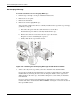
To replace the IDE CD-ROM drive:
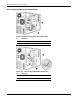
1. Perform steps 1-3 of the pre-installation instructions.
2. Remove the access panel.
3. Remove the front bezel.
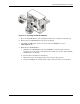
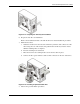
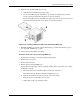
4. Remove the currently installed CD-ROM drive from the server:
a. Disconnect the IDE power and data cables from the rear of the CD-ROM drive.
b. Press the drive-retaining lever.
c. Move the lever downward to release the bar from its retaining hook.
d. Gently pull out the CD-ROM drive from the chassis.
2-14 HP ProLiant ML110 Generation 2 Server Maintenance and Service Guide