
ProLiant ML110 Generation 2 Server Maintenance and Service Guide


Removal and Replacement Procedures
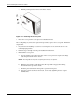
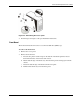
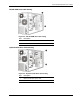
Figure 2-3: Removing the front bezel
3. Place the front bezel in a safe place for reinstallation later.
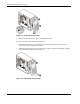
To replace the front bezel, follow the steps below:
1. Position the bezel so the two mounting tabs are aligned with their notch on the front
panel, then insert the tabs into their notch.
2. Align then insert the two plastic retention clips to their notch on the front panel, and then
press them firmly until they snap into place.
Figure 2-4: Reinstalling the front bezel
2-8 HP ProLiant ML110 Generation 2 Server Maintenance and Service Guide