
ProLiant ML110 Generation 2 Server Maintenance and Service Guide


Removal and Replacement Procedures
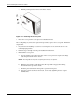
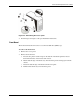
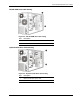
Figure 2-2: Reinstalling the access panel
4. Perform steps 5 through 7 of the post-installation instructions.
Front Bezel
The front bezel must be removed to access the hard disk drive (HDD) cage.
To remove the front bezel:
1. Remove the access panel.
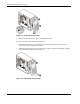
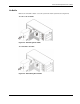
2. Remove the front bezel:
a. Press the two plastic retention clips on the bottom of the bezel upward to release
them from their tabs on the inside of the chassis.
b. Tilt the bottom edge of the bezel away from the front panel to disengage it from the
chassis.
c. Detach the bottom edge of the bezel from the front panel.
d. Pull the whole bezel away from the front panel.
HP ProLiant ML110 Generation 2 Server Maintenance and Service Guide 2-7