HP ProLiant ML10 Server User Guide
Manuals
Brands
HP Manuals
Server
HP ProLiant ML10 Server
31
32
33
34
35
36
37
38
39
40
Hardware
options installation
34
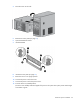
8.
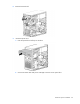
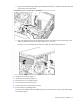
Remove the E
MI shield.
9.
Install the optical driv
e:
a.
Insert the optical drive halfway into the drive.
b.
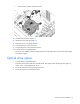
Connect the SATA c
able and power cable (P6) to the rear of
the optical drive.
1
...
...
32
33
34
35
36
...
...
76