- HP Proliant MicroServer Gen8 Manual
Manuals
Brands
HP Manuals
Server
HP ProLiant MicroServer Gen8 712317001
31
32
33
34
35
36
37
38
39
40
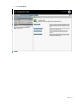
Setup
39
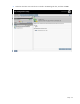
2.
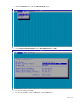
Under the
Network
me
nu, select the
NIC and TCP/IP
option.
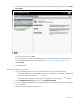
3.
Set the
Network Interf
ace Adapter
field to
Shared Network Port
—
LOM
.
4.
To save the chan
ge, press
F10
.
5.
To close the iLO RB
SU, under the
File
menu, select the
Exi
t
option.
1
...
...
37
38
39
40
41
...
...
99