
Read Before Install - HP ProLiant DL-Series Carrier-Grade Servers

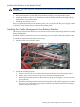
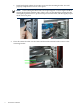


e. Install and lightly tighten the two M5 screws into the mounting bracket. You will
properly torque these screws at a later point.
NOTE: The mounting bracket needs to be torqued tight at a certain angle to hold its
retainer bracket flush with the CMA. That is why you first install the retainer bracket
with lightly tightened screws, position it in place over the CMA, and then tightly torque
all the screws in place.
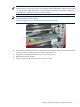
3. Place the retainer bracket over the CMA and thread the retainer bracket screws to the
mounting bracket.
6 Installation Guidelines