
Read Before Install - HP ProLiant DL-Series Carrier-Grade Servers

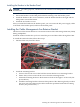
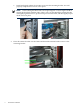


IMPORTANT: Each retainer bracket needs to match the sag of each CMA and remain flush
with its CMA in order to properly hold it in place during earthquakes. Otherwise the CMA
can slip out from under the retainer and swing freely in the rear of the cabinet, damaging
itself and other components in the rear of the cabinet.
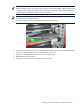
NOTE: Due to the sag of the CMA from the cable weight, there might be a gap between
the CMA and the retainer bracket.
To close the gap, press the retainer bracket down onto the CMA.
4. Unscrew the retainer bracket screws and remove the retainer bracket. The mounting bracket
screws are only accessible with the retainer bracket removed.
5. Torque the mounting bracket M5 screws to 26 in-lb (3 N-m).
6. Reinstall the retainer bracket.
7. Torque the retainer bracket screws to 15 in-lb (1.7 N-m).
Installing the Cable Management Arm Retainer Bracket 7