
Microsoft Exchange 2000 Consolidation Using ProLiant Essentials Workload Management Pack

Microsoft Exchange 2000 Consolidation Using
T
ECHNOLOGY BRIEF (cont.) ProLiant Essentials Workload Management Pack
.
.
.
.
.
.
.
.
.
.
.
.
.
.
.
.
.
.
.
.
.
.
.
.
.
.
.
.
.
.
.
.
.
.
.
.
.
.
.
.
.
.
.
.
.
.
.
.
.
.
.
.
.
.
.
.
.
.
.
.
.
.
.
.
.
.
.
.
.
.
.
.
.
.
.
.
.
.
.
.
.
.
.
.
.
.
.
.
.
.
.
.
.
.
.
.
.
.
.
.
.
.
.
.
.
.
.
.
.
.
.
.
.
.
.
.
.
.
.
.
.
.
.
.
.
.
.
.
.
.
.
.
.
.
.
.
.
.
.
.
.
.
.
.
.
.
.
.
.
.
.
.
.
.
.
.
.
.
.
.
Add the Active Process to Resource Partition
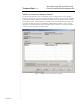
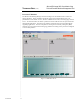
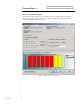
The Resource Partition Processes screen displays processes assigned to the resource partition.
Figure 2 shows the store.exe process assigned to the EXstore partition. The process will remain in
a pending state until the partition is activated by the RPM service. Partitions are either Available
(not started) or Active. When a partition is Available, the processes assigned to the partition may
be running; but those processes are not managed by RPM until the partition is Active. Not all
partitions are activated at this time due to a potential conflict. After this is resolved, as described
in the next section, the partition is then activated.
Figure 2. Adding a Process to a Resource Partition
7
TC020602TB