
HP ProLiant DL760 Generation 2 Server Upgrade Poster

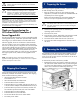

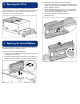
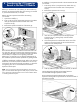
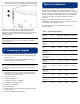

3. Install the rear service number label (1) next to the existing
server serial number (2) on the left rear edge of the server.
These service numbers will be used to identify the type of
system you have and will be sure that proper help and
diagnosis is given by the HP Call Center or service technician.
The service number labels should be referenced when
calling for service.
IMPORTANT: Do not superimpose the service number label over the
serial number labels. The service number labels are needed for
warranty purposes.
9 Completing the Upgrade
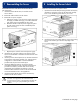
1. Slide the server back into the rack.
2. From the rear of the rack, attach the cable management
arm to the server.
3. Reinstall all I/O cables and power cables. Verify the
power supply (AC) LED is solid green.
IMPORTANT: ProLiant DL760 G2 server configurations require 220V
power. Install the 220V power cables that came with your server, if
not already in use (two 220V power cables are available in the
upgrade kit).
4. From the front of the server, verify that the interconnect
check light is not lit. This ensures all critical components
are properly seated in the server.
5. Power up the server.
6. Run system diagnostics.
7. Configure the server, using RBSU.
8. Reinstall the operating system.
9. Reinstall the applications.
10. Restore the data.
11. Register the new system configuration with HP for proper
service response.
12. Discard or redeploy remaining parts.
Memory Considerations
The upgrade kit comes standard with 10 PC133 SDRAM
DIMMs. The upgraded server can support either PC100 or
PC133 memory. In addition, both PC100 and PC133 memory
can be installed in the system at the same time, as long as the
memory is installed in different bank pairs. With any PC100
memory in the system, the memory subsystem will run at
100 MHz.
Eight or ten DIMMs are required to fill bank pairs, as
indicated by socket numbers 1&2, 3&4, 5&6, 7&8, and must
be installed in numerical bank order.
To install PC100 memory in the system, use one of the
following DIMMs.
yromeM001CPdetroppuS:1elbaT
traPPH
rebmuN
-859011
230
-959011
230/130
-959011
240/140
-549511
240/140
eludoM
ytisneD
BM652BM215BM215BG1
forebmuN
nosMARD
eludom
81638163
.hceTMARDS
desU
BM821BM821BM652BM652
forebmuN
repsknaB
eciveDMARDS
4444
rebmuN
sknaBlacisyhP
eludoMno
1212
lacisyhP
eludoM
noitazinagrO
27xM2327xM23x227xM4627xM46x2
eludoM
fonoitceleS
MARDS
gniknaB
1AB-0AB1AB-0AB1AB-0AB1AB-0AB
gnisserddA
)loC/woR#(
11/2111/2111/31
11/31
sserddAwoR
seniL
11A-0A11A-0A21A-0A21A-0A
nmuloC
seniLsserddA
,9A-0A
11A
,9A-0A
11A
,9A-0A
11A
,9A-0A
11A
eciveDesaB
desU
4xM234xM234xM464xM46