
HP ProLiant DL760 Generation 2 Server Upgrade Poster



7 Reassembling the Server
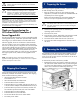
Reassemble the server with all the new ProLiant DL760
G2 components.
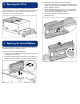
1. Install the ProLiant DL760 G2 I/O module into the
server chassis.
2. Reseat the media module into the chassis.
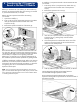
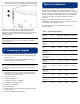
3. Reseat the two power supplies:
a. Slide power supply 1 into the power supply cage until
the supply is seated securely (1). This action automati-
cally pushes the spring-loaded trap door open.
b. Raise the handle to lock the power supply into place
(2). The power supply fan starts immediately if the
system is running.
c. Repeat steps a and b for the second power supply.
4. Install the new I/O lid by sliding it into the front of the
server. The hood label is oriented to be read from the front
of the server.
5. Install a processor board option kit into the ProLiant DL760
G2 processor and memory module if an eight-processor
configuration is desired. Refer to the documentation
provided with the processor board option.
6. Install any additional memory into the five memory
cartridges located at the front of the ProLiant DL760 G2
processor and memory module. Refer to the memory
requirements and installation procedures in the HP
ProLiant DL760 Generation 2 Server User Guide located
on the Documentation CD in the upgrade kit.
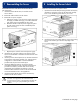
7. Install the ProLiant DL760 G2 processor and memory
module into the server chassis.
WARNING: The processor and memory module weighs
more than 15.9 kg (35 lb). HP recommends either
removing ALL the memory cartridges before handling the
module, or having two people handling the module
together.
8 Installing the Server Labels
Install the ProLiant DL760 G2 specific labels.
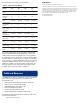
1. Install the front hood label (accessing module and memory
information). Align the corners of the label and carefully
lower it over the existing front label on your server.
2. Install the front service number label (1) next to the existing
server serial number (2) on the front top edge of the
server.
Continued on next page