
HP ProLiant DL760 Generation 2 Server Upgrade Poster

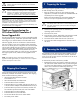

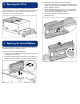

4 Removing the I/O Lid
With the processor and memory module removed from the
chassis, remove the I/O lid. Grasp the sides of the I/O lid and
slide it forward until it is free of the server chassis and set
aside. The I/O lid will not be reused.
5 Replacing the System Midplane
The system midplane assembly is the board to which the server
modules and the power supplies connect.
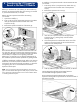
To remove the system midplane assembly:
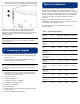
1. Loosen the two thumbscrews securing the system midplane
assembly to the chassis (1).
2. Remove the system midplane assembly from the chassis (2)
and set aside. The midplane assembly will not be reused.
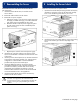
To install the ProLiant DL760 G2 system midplane:
1. Angle the bottom edge of the midplane assembly into the
chassis (1), making sure that the edge is seated under the
chassis midplane retainers.
2. Tilt the midplane assembly vertical (2), ensuring that the
tab on the chassis engages the slot on the assembly. This
secures the midplane assembly in place.
3. Secure the midplane assembly with the two
thumbscrews (3).