
Compaq ProLiant DL760 Service Overview



Compaq ProLiant DL760 11
Compaq Confidential - Need to Know Required
Rev. 1.21 Page 11 of 12
RBSU Operation
Starting and Exiting RBSU
During initial installation when the server is not yet configured, RBSU starts automatically. After
the server has been configured, you can launch RBSU by pressing F9 when prompted during the
power up. Once you are finished with configuration activities you can exit RBSU by pressing
Escape at the main menu and confirming your intention by pressing F10.
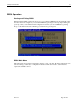
RBSU Main Menu
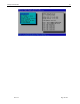
The main menu selects which configuration setting to view or modify. From the main menu some
selections bring you directly to configuration functions while others lead to sub menus that
expand the available choices.