
Compaq ProLiant DL760 Servers Maintenance and Service Guide

Connectors, Switches, and LED Indicators 4-7
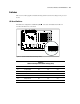
SW1 - SW4 Processor Board Bus/Core Frequency Ratio
Processor board bus/core frequency ratio switches can be set manually or by the system ROM.
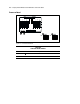
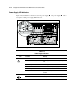
Figure 4-5 shows the location of the processor board bus/core frequency ratio switches.
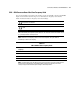
Table 4-6 shows the bus/core frequency ratio switch settings.
CAUTION: Setting the processor switchbanks incorrectly can result in permanent damage to
the processor or in data loss.
CAUTION: The server will NOT boot if the Intel Pentium III Xeon processors are NOT the same
speed.
IMPORTANT: The bus/core switches are delivered set at the Off position. This default setting allows the
ROM to automatically set the optimal speed for the buses. The server will not start if the switches are set
to a speed higher than the slowest processor.
NOTE: When all bus/core frequency switches are set to the Off position, the system ROM will
automatically set the bus/core frequency.
Table 4-6
SW1–SW4 Bus/Core Frequency Ratio
Bus/Core
Frequency
Ratio SW 1 SW 2 SW 3 SW 4
550 5 ½ OFF OFF OFF ON
700 7 ON OFF ON OFF
900 Auto OFF OFF OFF OFF
ROM Default Auto OFF OFF OFF OFF
NOTE: The Intel Pentium III Xeon 900 MHz processors bus/core frequency ratio comes locked from Intel.
These processors automatically run at 900 MHz regardless of the bus/core frequency ratio switch
settings. Compaq recommends leaving these settings in the default positions.