
Compaq ProLiant DL760 Servers Maintenance and Service Guide

Removal and Replacement Procedures 2-49
Fan Cage Assembly
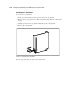
To remove the fan cage assembly:
1. Perform the preparation procedures. See “Preparation Procedures” earlier in this chapter.
2. Remove the I/O module. See the sections on removing the I/O Modules earlier in this
chapter.
3. Remove any PCI/PCI-X expansion boards in slots 10 and 11. See “Removing a
PCI/PCI-X Expansion Board” earlier in this chapter.
4. Remove the hot-plug I/O fans. See “Hot-Plug Fans” earlier in this chapter.
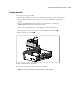
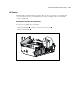
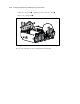
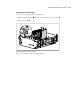
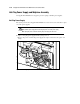
5. Loosen the three screws securing the fan cage assembly to the I/O module .
6. Remove the fan cage assembly .
2
1
Figure 2-44. Removing the fan cage assembly
Reverse steps 1 through 6 to replace the fan cage assembly.
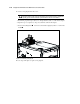
NOTE: The server boot block ROM is located underneath the fan cage assembly.