
Compaq ProLiant DL760 Servers Maintenance and Service Guide

2-4 Compaq ProLiant DL760 Servers Maintenance and Service Guide
Before beginning any of the removal and replacement procedures for non-hot-plug devices:
1. Press the Power On/Standby switch to Standby. This action places the server in Standby
mode, thereby disabling the main power supply output and providing auxiliary power
(+5V) to the server. Standby does not disable main input power.
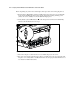
2. Verify that the system LED indicator on the front panel, near the Power On/Standby
switch, is off and that the fan noise stops.
1
Figure 2-1. System LED indicator
3. Disconnect all power cords from the server to disable all power to the server.
4. For some removal and replacement procedures, you must remove the server from the rack
and place it on a sturdy table or workbench. Refer to the Compaq ProLiant DL760 Servers
User Guide for further instructions.