
ProLiant DL760 Generation 2 Server Maintenance and Service Guide

I/O Module Removal and Replacement Procedures
6-24 HP ProLiant DL760 Generation 2 Server Maintenance and Service Guide
Internal Battery
WARNING: The server contains an internal lithium cell battery. There is risk of fire and
burns if the battery pack is incorrectly replaced or not handled properly. To reduce the
risk of personal injury, do not attempt to recharge the battery. Do not expose to
temperatures higher than 60°C. Do not disassemble, crush, puncture, short external
contacts, or dispose of in fire or water. Replace only with the HP spare designated for
this product.
CAUTION: Replace the lithium battery within 15 minutes of removal to avoid the loss of BIOS
settings. Once BIOS settings are lost, a reconfiguration is necessary to restore them.
To remove the internal battery:
1. Power down the server. Refer to “Pow ering Down the Server” in Chapter 2.
2. Open the I/O lid. Refer to “I/O Lid” in Chapter 3.
3. Remove hot-plug I/O fan 2. Refer to “Hot-Plug Fans” in this chapter.
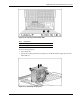
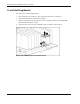
4. Locate the battery on the I/O board.
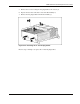
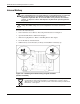
5. Pull the battery out of the battery socket (1) and install the new battery (2).
Figure 6-23: Removing the internal battery (fan guide and other
plastics not shown)
CAUTION: Batteries, battery packs, and accumulators should not be disposed of
together with the general household waste. To forward them to recycling or proper
disposal, please use the public collection system or return them to HP, your authorized
HP Partners, or their agents.