
ProLiant DL760 Generation 2 Server Maintenance and Service Guide

I/O Module Removal and Replacement Procedures
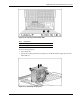
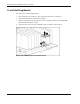
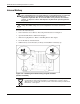
To replace the fan cage assembly:
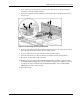
1. Fit the top hook on the rear assembly of the respective top module spool.
2. Rotate the assembly down to fit the bottom assembly flange under the bottom spool.
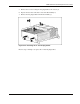
a. Be sure the tab is inside the module.
b. Line up the captive screw with the hole on the module center wall.
c. Fit the notch on the bottom of the assembly over the respective module spool.
3. Tighten the captive screw.
HP ProLiant DL760 Generation 2 Server Maintenance and Service Guide 6-21