
ProLiant DL760 Generation 2 Server Maintenance and Service Guide

I/O Module Removal and Replacement Procedures
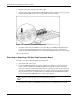
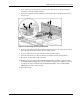
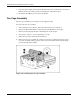
3. Lower the new hot-plug fan into the I/O module until it rests on the I/O board connector.
Push the fan into the connector. The fan locking latch will lock into place.
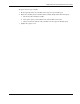
4. Be sure that the LED is green and close the I/O lid.
Fan Cage Assembly
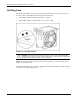
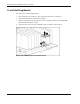
The fan cage assembly has an integrated center support bracket.
To remove the fan cage assembly:
1. Power down the server. Refer to “Pow ering Down the Server” in Chapter 2.
2. Remove the I/O module. Refer to “Removing the I/O Module” in t his chapter.
3. Remove the hot-plug fans. Refer to “Hot -Plug Fans” in this chapter.
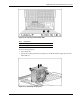
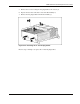
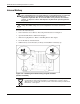
4. Unscrew the “captive” s crew (1) and lift the screw up.
5. Push in the tab on the side of the I/O module (2).
6. Remove the fan cage assembly by rotating it up and out (3), lifting the hook (4) on the
rear of the assembly off the top spool on the rear of the module and clearing the flange
(5) and notch (6) of the module.
Figure 6-20: Removing the fan cage assembly
6-20 HP ProLiant DL760 Generation 2 Server Maintenance and Service Guide