
ProLiant DL760 Generation 2 Server Maintenance and Service Guide

I/O Module Removal and Replacement Procedures
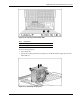
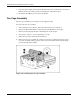
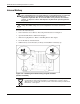
Figure 6-18: Hot-Plug Fan Attention LEDs
Item Component
1 Hot-plug fan 1 attention LED
2 Hot-plug fan 2 attention LED
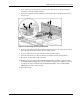
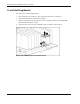
To replace the hot-plug fan:
1. Open the I/O lid.
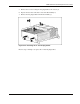
2. Squeeze the locking latch with your fingers (1) and lift the failed hot-plug fan out of the
I/O module (2).
Figure 6-19: Removing hot-plug fan 2
HP ProLiant DL760 Generation 2 Server Maintenance and Service Guide 6-19